A KAKIJUDI withdrawal is a request to move ringgit from your signed-in wallet to a bank or payment account in your name. It is not a second deposit. Malaysian members send RM in, play in RM, and ask for RM back. The cashier on your login: the method list, the floor, the ceiling, and the wait next to the rail you pick. Processing time is not a fixed figure. It depends on the method, plus any check still open on the file.
Only the withdrawable figure can leave. Bonus funds, unfinished promo play, and locked winnings stay until the live sheet says they are clear. Read the wallet labels. Do not type the full balance if part of it still shows as bonus.
Who can withdraw, and what still blocks the send
The desk matches the person on the login to the person on the payout. Use the legal name on your bank app at registration. Finish the identity check on the official screen, often labeled KYC, before you need the money. Your first cash-outs often wait on that file more than on the game you played. Photograph your MyKad or passport in daylight, with the full document in frame and the clock readable. Cropped corners waste a round trip. Do not upload those photos to a file link that arrived outside the site.
Verification is done when the official dashboard says so, not when a stranger in Telegram says your file is “cleared.” If a prompt is still open, finish it on that screen. A selfie that hides the face, a photo under yellow night light, or a thumb over the IC number comes back. Retake it. Do not send a second set through a different chat “to speed it up.”
The receiving account has to be yours. A spouse’s book, a friend’s wallet, or a number you borrowed for a deposit is the pattern that comes back. Fix a nickname-versus-legal-name mismatch while the wallet is quiet. Do not change payout details while a ticket is already pending unless the live terms clearly allow it.
Minimum and maximum sit on the method row in MYR. Some rows also print a daily cap. Copy those figures from the cashier you are on today. A floor from a group chat last month is not your floor. Below the min, the form rejects you. Above the max, it rejects you. Typing the full wallet when part of it still shows as bonus is how people get a smaller send than they expected, or a hard no.
If the amount you want sits above the daily print, wait for the reset shown on that row. Do not open a second login to split the send. Duplicate files get closed—one person, one account, one payout name.
A claimed extra on the live promotions sheet can hold cash-out until the play count is done. Read the wager, the eligible rooms, the max stake, the expiry in Malaysia time, and whether the Deposit, the extra, or both must be cleared. Many members play the first sitting on cash so the first withdrawal is simpler. If you already claimed, finish that sheet or follow the printed forfeit rule. Guessing does not clear the hold.
Open the same promo tile you opted into and look for remaining play, eligible rooms, and any cash-out cap. Screenshot that tile before you tap Withdraw. If the tile and the cashier disagree, the live tile for that offer still governs the extra. Playing without a bonus is still normal on later sittings.
How to take money out, one screen at a time
Log in
Open the bookmark. Wait for the full page. Tap Login, Loginegister. Enter the same username, email, or phone you registered with, then the password. If a one-time code appears, use the one from your own SMS. Staff will not ask you to forward that code in a private chat. One clean submit. A slow mobile network can look frozen. Count to ten before you tap again. Two rapid submits can open two requests and a confusing error.
Stay on the dashboard a minute. Open history if the site shows a last-login time and match it to this sitting. If it shows a session you didn’t do, change the password in settings before you touch the cashier.
Open cashier
Find Wallet, Cashier, or Account on a phone; that control often sits in the corner menu. Tap Withdraw or Cash Out, not Deposit, not a promo tile. Deposit opens a path in. Withdraw opens the path out. If two buttons sit together and you tap the wrong one, back out at the first extra field. Stay on that screen. Read the withdrawable amount before you type. If the figure looks wrong, open history first. A sitting you already played may still be settling. Do not guess the gap.
Pick the payout method.
The cashier lists what this login can log in today. Pick one row. Read the text under it: min, max, and any note about name match or extra checks. A method you used to deposit may not appear here. A grey or missing row is off for this file right now. Do not hunt for a “faster” personal account in a chat. Save the payout details on the official form. Do not paste them into a helper’s message so they can “process it for you.”
When the same bank you used to deposit is on the withdrawal list, use that row. The house already matches that name. A brand-new account number on a first cash-out is a longer file, not a faster one.
Enter the details and confirm once
Type the ringgit figure once. Look at it. Check it against three numbers on the same screen: withdrawable balance, the method minimum, and the method maximum. Confirm bank name, account number, and account holder. One wrong digit wastes the wait. If this is your first cash-out, a smaller amount you can actually spare is easier to match later in your bank app. Leave enough in the wallet if a game round is still open. Submit once. If the site shows a reference, screenshot that frame with the Malaysia clock visible. Send that image to contact us if the status stalls.
Watch history until the ticket completes
Open history after submitting. Pending means the desk has the ticket. It does not mean the bank SMS should already be in your pocket. Do not submit the same amount again because the SMS is late. Two tickets for one sitting tangle the wallet. If Cancel is still on that ticket, use it only before the status moves. Once it is processing, leave it. Write support with the reference if you tapped it by mistake. Do not open a second cash-out to “undo” the first. Do not send a new deposit “to test” while this request is in flight.
When history shows Completed, open your bank or wallet app and match the credit to the same RM and date. A completed KAKIJUDI ticket with no bank line yet is still a bank wait, not a new cashier job. Shade the phone outdoors so the RM figures stay readable. After you rotate the screen, read the address bar again. A redirect that only appears in one orientation is a stop.
Payout methods Malaysian members actually see
Use only the methods the withdrawal screen shows on this login. Loginmax, and the time estimate live on that row. If this page and the cashier disagree, the cashier wins. Screenshot the row you tapped. A method that sits only on the deposit list is not a cash-out path.
Local bank transfer. This is the usual path out. Maybank, CIMB, Public Bank, RHB, and Hong Leong appear when the operator lists them. The account holder name must match the KAKIJUDI profile. Joint accounts, business accounts, or a relative’s name are common rejection reasons. First cash-outs on a newly saved bank can sit longer because the file is still being checked. That extra wait is a review. It is not a second deposit you need to send.
E-wallets and digital payments. Touch ‘n Go, DuitNow, and GrabPay count only if those names sit on your withdrawal list. A wallet you used to deposit is not automatically a cash-out path. The wallet profile has to be yours. A borrowed number will not pass the name check. If the wallet app later holds the credit for its own reason, that clock sits with the wallet, not with the KAKIJUDI ticket you already sent.
Copy the wallet number or DuitNow ID from your own app, not from memory. A saved old number you no longer use will fail after you already waited. If GrabPay is missing from the strip, it is not live for you. Skip the personal QR a stranger posted in a story.
Crypto, if your strip shows it. Some logins show USDT or BTC after verification. Treat that row as its own product. Copy the network, the address, and the printed settlement note from the form. A wrong network is a lost send. Settlement on-chain can look fast while the house review still sits. If crypto is missing from your strip, it is not available to you today. Do not paste a wallet address into a helper’s chat so they can “process it.”
Write the network name in your notes app before you paste the address. USDT on the wrong chain is not a support fix. Wait for history to show the house status before you refresh an explorer every minute.
How long it takes, and who charges
No single clock applies to every KAKIJUDI cash-out. The cashier row is the first estimate. History is the second. Your bank or wallet is the third. Some rows print a short house window, often 15 to 60 minutes after the desk accepts the ticket. Instant still meets bank cut-offs, night queues, and public holidays on the way into your book. Weekend bank time still applies after the platform marks a request as sent. Copy the window printed next to the method. If this guide and that line disagree, that line wins.
Verification slows the first payout on a new file, and it slows any payout if an ID prompt is still open. Method matters: bank, e-wallet, and crypto do not share one speed. A large amount for this login, Loginpayout account you just saved, can sit in review after the form has already accepted the tap. Wrong account details send the ticket back after the wait, which feels like a delay and is actually a rejection.
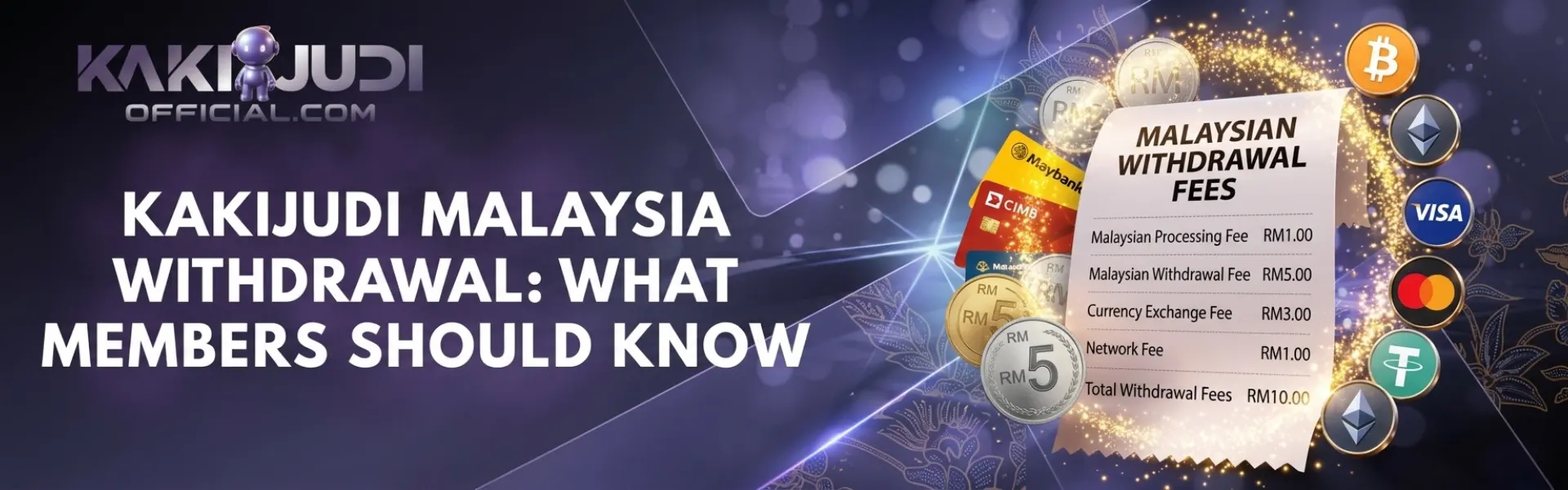
KAKIJUDI often lists withdrawals as free on the method row. Read that row anyway. A bank, an e-wallet, or a crypto network can still take their own cut, or hold a small amount for their own check. If a fee is printed next to the method, subtract it before you decide the amount. If the row says no house fee, do not assume the receiving app is also free.
Photograph the fee line with the RM amount in the same frame. That photo ends later arguments about why RM 500 left the wallet, and RM 498 landed. Keep it with the request ID until the bank line shows.
When the money sits, or the ticket comes back
The request is still pending
High traffic, bank maintenance, and public holidays stretch a request that already left the cashier—open history. Confirm the ticket is still Pending, not Rejected or Completed. Wait for the window you screenshotted (Malaysia time) before you write anyone. If that window has passed and the status has not moved, send one message: username, request ID, RM amount, method, and the screenshot with the clock. Do not open a second withdrawal for the same money while this one is pending.
The request was rejected or held.
Read the reason on the ticket if the site prints one. Check the account number digit by digit against your own app. Check identity status on the dashboard. If a promo is still active, open the live sheet and see whether cash-out is blocked until counted play is finished. A large amount for this login, a Loginly saved payout account, or a security check can hold the file without a reject. That hold is the house reading the record. It is not a request for you to resend the same RM on a second form. Fix the real cause, then submit once. A reject is not repaired by tapping the same wrong details at a higher amount.
The method is greyed out or missing.
Grey, missing, or “not supported” means that rail is off for this login. Look at the other rows the cashier still offers. Confirm on the official screen, not in a chat that promises a private payout account. If every method is gone, screenshot the empty cashier and write support. Do not jump to a mirror site because it shows a button this one does not.
The amount on the ticket looks wrong.
The amount you typed is the amount the house tries to send, within the method limits. If the ticket shows a different figure, you may have used the full wallet instead of the withdrawable line, or the form rounded to the method’s step. Compare the ticket to the min and max on that row. Edit and resubmit only after the old ticket is dead. Two live tickets for “the right amount” is how people cash out twice or lock the wallet.
How to reach the desk
Open the official contact after logging in. Live chat is the fastest path for a ticket that just stalled. Telegram or WhatsApp only if those buttons appear on the official contact page. A number that messaged you first is not the desk. Do not send a password, an OTP, or a full bank number in that chat. Write: I need help with a withdrawal. Time: [Malaysia date and hour]. Amount: [RM]. Method: [bank or wallet name]. ID: [request reference]. Wallet [did/did not] move. Then one full-screen image. That is the whole first message.
Keep the ticket in one thread. A second chat with the same story, minus the ID, resets the queue. If they ask for another photo, send that photo. Do not add a new complaint about a different game in the same withdrawal ticket.
Keep the cash-out on your own login.
Log in to money on a page you typed yourself. Payout details leak through shared Wi-Fi, borrowed phones, and helpers who want your account number.
- Open only the official KAKIJUDI site you typed or bookmarked
- Stay off cafe Wi-Fi when you move money; use your own data
- Skip shared phones; log out, then kill the saved session
- Turn on two-step login in account settings if the menu offers it
- Keep bank details off group chats, ads, and unofficial helpers
- Read the payout name and number twice before submitting
Update the password on a device you own, not on a handset you borrowed for “one cash-out.” Change it after a shared sitting. Do not tick keep me signed in on a phone you do not own.
If you use the official app, install it from the path on the site you typed, then cash out inside that login. Login forwarded in chat is not KAKIJUDI. If history shows a withdrawal you did not tap, change the password in the same sitting and write support with the time you noticed it.
Children should never see this login. Log in with what you can afford to lose. Limits and cool-off sit under responsible gaming if a sitting is getting away from you.
Name the bookmark in your own words so you can find it on a crowded phone. Open that bookmark the next time you cash out. The real cashier lives at the address you typed, not on a link that arrived in a story.